
How Chartales Works · Chartales
You have the data.
Here’s how it becomes a story.
Upload a file. Ask one question. Get a chart, a written finding, and a ready-to-share export. No dashboards. No SQL. No waiting.
Four steps from file to published insight
Upload any tabular file
Start with a CSV, TSV, XLS, or XLSX. In this walkthrough, the dataset tracks occupation, sleep duration, stress, and activity across eleven job types. Chartales inspects column types, identifies usable fields, and prepares the file for questioning. Signed-in uploads are saved to your private workspace so you can return to them any time.
- Handles messy headers and mixed column types
- Recognizes numeric and categorical columns automatically
- Files saved to your workspace when signed in
sleep-health-and-lifestyle.csv
Drop your file here
CSV · TSV · XLS · XLSX
| occupation | sleep_hours | stress_level | activity |
|---|---|---|---|
| Engineer | 8.0 | 3.9 | Moderate |
| Sales Representative | 5.9 | 8.0 | Low |
| More occupations, activity levels, and health metrics... | |||
Discover questions
AI-suggested questions
Or type your own
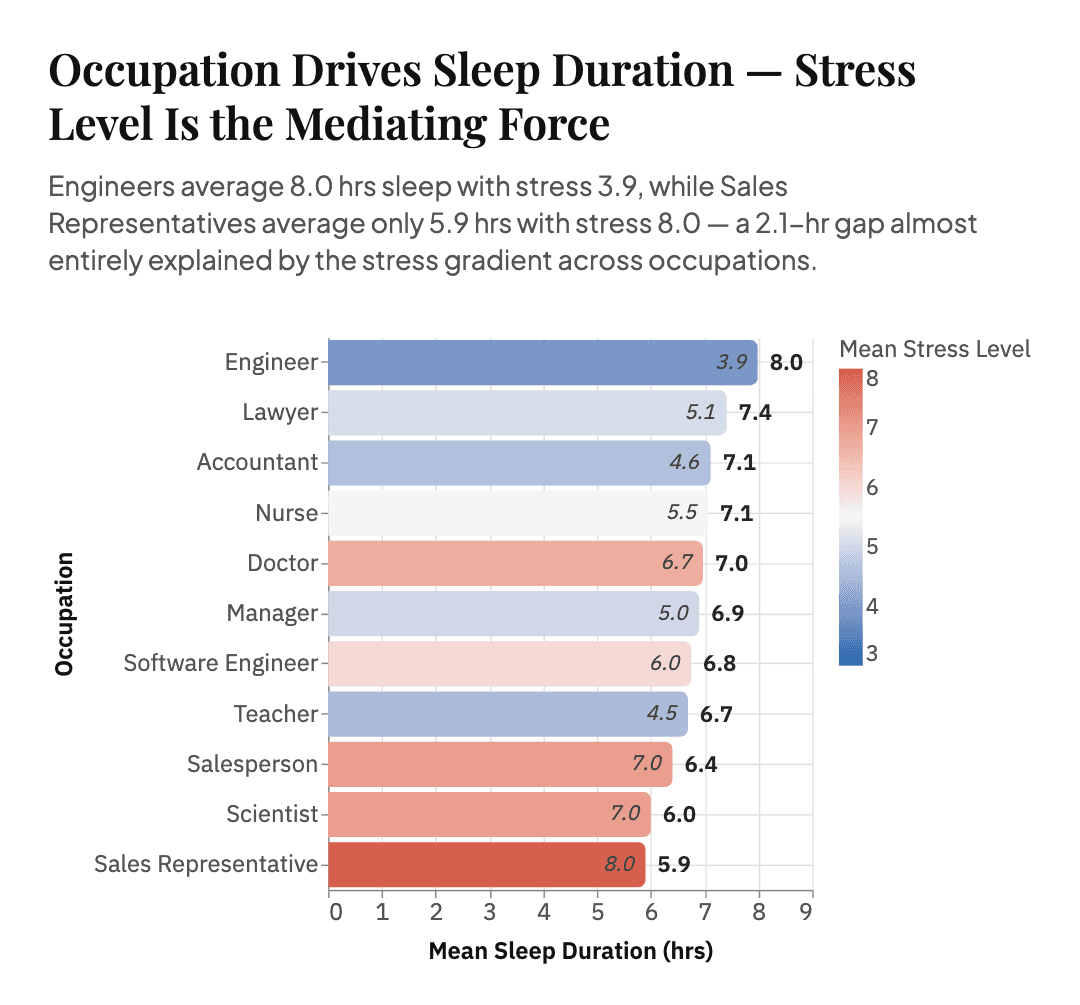
“Is there a relationship between occupation type and average sleep duration, and does stress level mediate this?”
Let AI suggest where to start
This is the anti-blank-canvas moment. AI reads your data and generates contextually relevant questions you can click to start, or type your own question directly. The mode you pick shapes the chart architecture and the tone of the story.
Compare options, support a call
Distributions, correlations, outliers
One dramatic, shareable narrative
See the story. Then push it further.
AI generates a chart and a plain-language insight grounded in your actual data — here, a ranked occupation view where the sleep pattern and stress gradient are visible immediately. Not happy with the angle? Ask a follow-up. Change annotations, labels, filters, or emphasis, and each message updates the chart in place. No restarts, no configuration panels, no blank-page moment.
- Interactive chart grounded in your data
- Plain-language key insight written for you
- Refine via chat: annotations, sorting, filters, focus
- Ask follow-up questions about the data
Generated insight
Key Insight
As mean stress rises from 3.9 to 8.0, mean sleep duration falls from 8.0 to 5.9 hours across occupations.
Ask a follow-up
sleep-health-and-lifestyle · export
Export package
Single-page PDF with the chart, edited insight, and takeaway ready for a research brief.
Export publication-ready. Share immediately.
When ready, export a single-page PDF — or PNG and SVG versions — containing the chart, key insight, and takeaway. Drop it straight into a report, slide deck, or post. No screenshots, no manual formatting, no post-processing needed.
- PDF includes chart + insight + takeaway on one page
- PNG and SVG for embedding in slides or docs
- Watermark-free on Starter and Pro plans
Three modes, one tool
The mode you pick shapes the chart type, layout, and insight framing. Choose based on what you actually need from the data.
When you need to compare options or groups and support a clear call.
- Grouped or stacked bars
- Side-by-side comparisons
- Reference lines for benchmarks
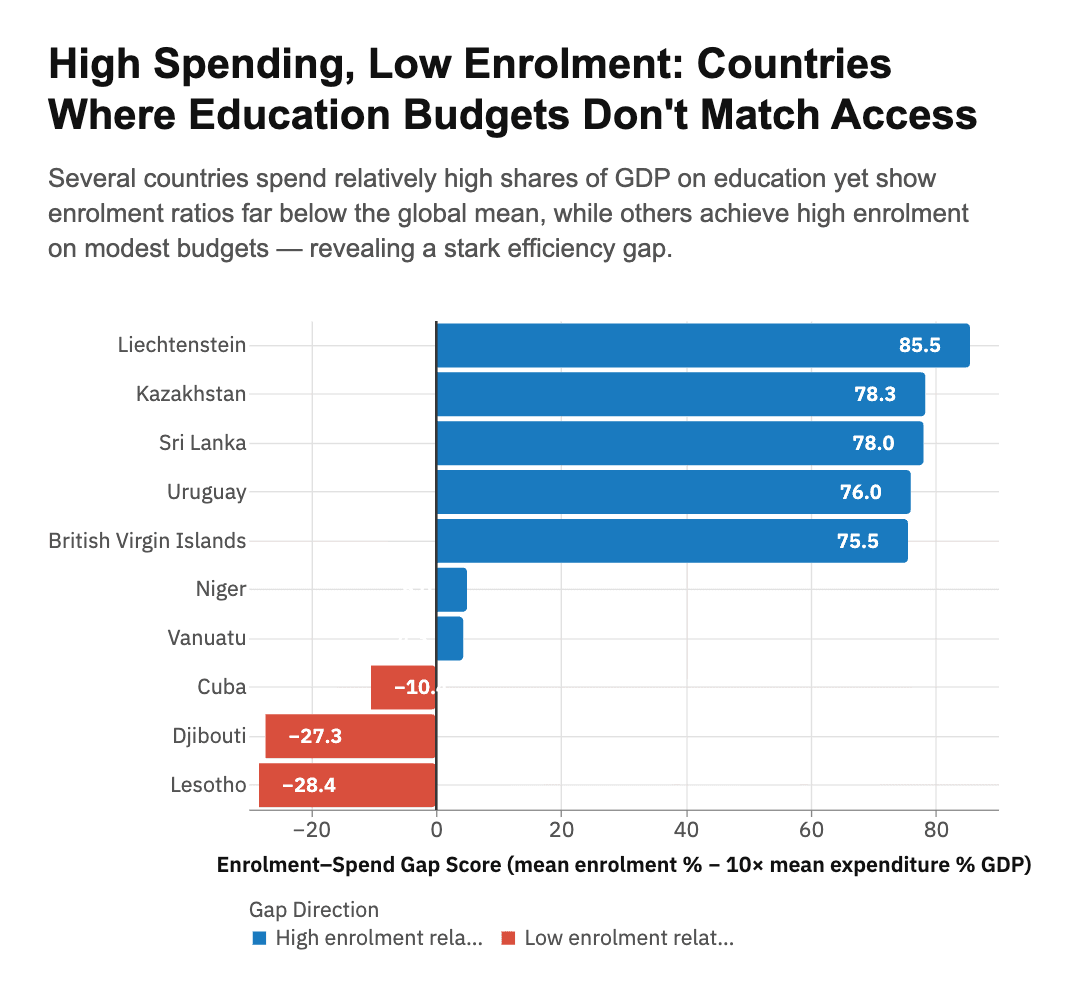
World Bank Education Statistics
Priya · Policy Analyst · International Affairs Think Tank
When you want to understand distributions, correlations, and outliers.
- Scatter plots, box plots, histograms
- Trend lines and confidence bands
- Multi-faceted breakdowns
Sleep Health & Lifestyle Dataset
Dr. James · Public Health Researcher
When you want one dramatic, shareable visual with a clear narrative.
- Editorial-styled chart
- Annotated scatter or line chart
- One bold view, one clear message
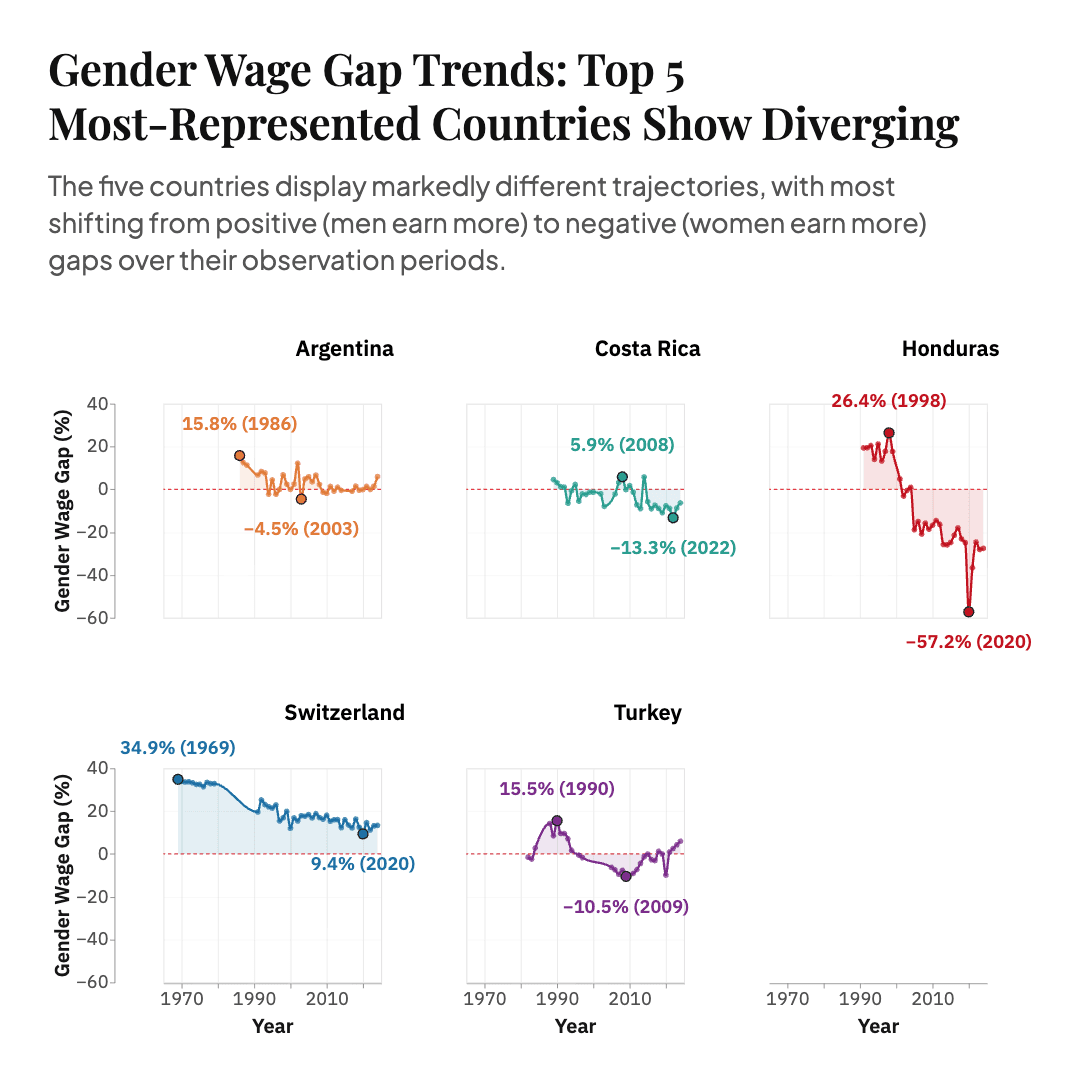
Gender Wage Gap — ILO
Maya · Economics & Society Journalist
Same data. Completely different conversation.
From a wall of rows to a clear, shareable story.
Before — Raw CSV
sleep-health-and-lifestyle.csv
Kaggle cohort| occupation | sleep_hours | stress_level | activity |
|---|---|---|---|
| Engineer | 8.0 | 3.9 | Moderate |
| Sales Representative | 5.9 | 8.0 | Low |
More occupations, activity levels, and health indicators...
The pattern is in there. It just is not visible yet.
After — AI-generated insight
Focus Question
“Is there a relationship between occupation type and average sleep duration, and does stress level mediate this?”
Key Insight
As mean stress rises from 3.9 to 8.0, mean sleep duration falls from 8.0 to 5.9 hours across occupations.
A hidden relationship becomes visible immediately.
Sense-making, not infrastructure
Optimized for exploration and fast communication — not a replacement for BI platforms or data pipelines.
Great fit
You need a fast answer from a dataset you just received
You're presenting findings to non-analysts
You want to explore the data before committing to Tableau or Power BI
You want a shareable chart in a slide or email without manual formatting
Not the right tool if...
You need a live, always-on dashboard
You need formal statistical modeling or hypothesis testing
You need ETL pipelines or data warehouse integration
Ready to tell your data story?
Upload a file and see what you can uncover in minutes. No credit card needed — 3 free insights included.